
Talk it through.
Think out loud with Chii. When a to-do comes up, ask Chii to draft a reminder for you to review.


Move your pointer close and Chii reaches out a hand.Tap Chii to say hello.
Think out loud with Chii. When a to-do comes up, ask Chii to draft a reminder for you to review.

Review Chii’s draft and choose Save reminder to see it appear in an example macOS Reminders list.
Open Reminders on your Mac and select the list you chose in Chii. In this example, it’s Personal.
Send the presentation
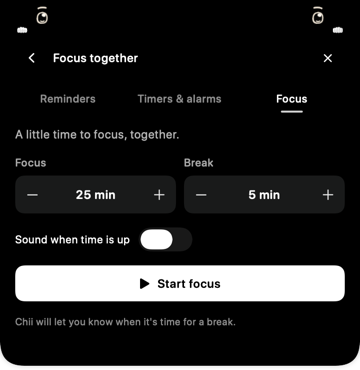
Choose a stretch of work and a little break. Chii keeps the timer at the top of your screen.
Put on a song and Chii pulls out a tiny piano. Watch those little hands play along.
Coming soon to the Mac App Store.
The core companion experience is planned to be free.
Ask for encouragement, a fresh idea, or a small next step. In the app, conversation uses Apple’s on-device AI when it’s compatible, enabled and ready.
About Chii’s AI →
What’s on your mind?
Choose a prompt to see a written example. This page isn’t an AI chat.
Describe a task, review the details, then choose Save. In the app, you choose the macOS Reminders list and grant access before Chii can save.
How reminders work →Try your own words. The text stays on this page until you reload.
Review before saving
Reminders
This demo uses example lists. Your entries stay in this page.
Choose your focus and break time in the app. A countdown stays near Chii, and you choose when to start your break.
Try a short version here. It pauses when you leave this example.

Website demo only. No Mac notification.
In the app, see what’s playing, use playback controls, and watch Chii’s instruments react to your Mac’s audio.
Apple Music catalog playback needs authorization and a streaming subscription. Play-along is a visual interpretation of the sound.
About music connections →
A quiet little morning
Press Play to watch a silent native animation.
A book, a snack, or a very small nap. Choose a moment and watch Chii above.
These are Chii’s actual app animations. Try a little moment, then look up.
Tap a moment, or drag a book or snack onto this sample desktop.
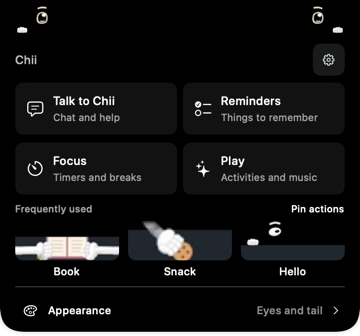
In the app, Chii also has expressions, quiet idle activities, customizable eyes and an optional little tail.
Pick the eyes, try the little tail, or turn the chatter down. Chii makes room for your day.
Connections are optional. Before a presentation or screen share, choose Hide for meeting, then bring Chii back from the app’s menu-bar icon.


The current release target is Apple silicon with macOS 14 or later. AI conversation needs macOS 26 or later, a compatible Mac and language, and Apple Intelligence enabled with its model ready. Final compatibility will be confirmed on the App Store page.
Yes. Chii’s activities, expressions and focus timer do not require AI. Optional connections ask for access when you choose to use them.
ChiiNotch is being prepared for the Mac App Store. There isn’t a public download yet. The planned launch keeps the core companion experience free.
The reviewer walkthrough introduces the real app, its optional permissions and its everyday controls. The interactions above are only this website’s playful preview.